Tag: Teaching Math with Technology

  • Question Banks for Math Grade 6-12

    Question Banks for Math Grade 6-12

    Image licensed under Public Domain CC0. Retrieved from http://pixabay.com/it/computer-piatto-questione-azione-27084/?oq=question%20bank
    Image licensed under Public Domain CC0. Retrieved from http://pixabay.com/it/computer-piatto-questione-azione-27084/?oq=question%20bank

    Many middle and high school classrooms already have clickers. It is a great system to collect students data and get instant feedback on the results of teaching. Teachers may write their clicker questions from scratch. However, what are other places that we can find questions? I have collected some free (or paid for a small fee) questions banks. Please contribute to this shared Google document if you know anything that is not here:

  • Free Web-based Tools for Math Visualization

    Free Web-based Tools for Math Visualization

    Mathematics is known to be a beautiful yet very abstract subject. It may be easy for mathematician to visualize complicate equations and functions in their brain, but sometimes can be challenging for students or starters to do this. However, with the advance of computer and graphing technologies. In the following i would like to introduce a few cool tools that are free for math visualization.

    The first tool that I like is Wolfgram Alpha. It is a very cool “Computational Knowledge Engine” (that’s what they call themselves). You can type in questions you want to know from basic algebra to a country’s population. Here I typed in the question of “how many people are there in China” since I am from there. They it will search and collect all information about China’s population and then generate charts based on information it collects:

    Wolfram Alpha - China Population

    Ok I know, we are talking about MATH visualization. So here it is:  if you type in a equation or a problem, Wolfgram gives you the chart based this. For example, typing in: plot r=cos(3*theta/5), you will get this:

    wolfram rose curve

    Or, it will solve equations for you:

    wolfram time delation


           Wolfram Education Portal

    Wolfram also provides an educational portal. The portal is currently in Beta version (as of July 2013), and you will need to create an account in order to use it. The content of Wolfram Educational Portal is based on the open book of CK-12 Algebra and it covers but not limited to topics such as equations and functions, real numbers, equations of lines, graphs of equations and functions, solving systems of equations, and polynomials. These contents can be demostrated directly on the Wolfram Educational Portal website. Or teachers can download them to computer and then view them in the Computable Document Format (CDF).

    Screen Shot 2013-07-24 at 1.14.23 PM


    The second interesting online math visulization tool is desmos.com

    Screen Shot 2013-07-19 at 3.12.17 PM Having a similar function of Wolfram Alpha, desmos provides on-screen math equation creation “keyboard” for easy creation of equations.

    Desmos is great for graphing at the k-12 level because it has sliders, can handle implicit relations, and can handle inequalities. However Desmos can’t handle calculus, which some high school students take.

    Desmos allows multiple equations and plots in the same time, therefore students can compare the change of the plots when the factors of the equations change:
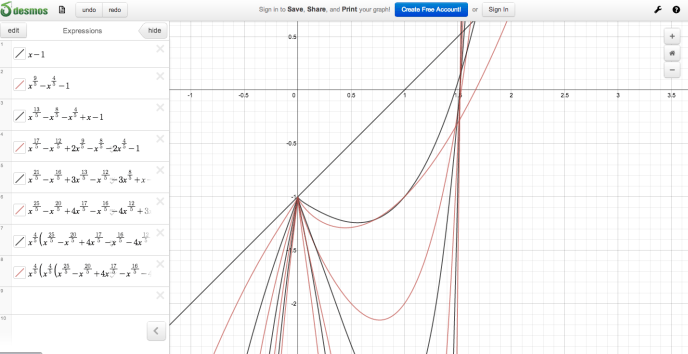
    desmos - multiple equations
    Type in an equation, then change the values of each factor, the plot on the right will change:desmos plot factor value change
    The exploration function on Desmos allows students to choose a topic on the left and then interact with the graph or modify the expressions:

    desmos exploration

    Lastly, Desmos has a nice gallery of math plots that were saved and shared by its community members, which may be easily adapted to your class:


    desmos gallery

  • Teaching Math with Interactive Whiteboard (IWB)

    Teaching Math with Interactive Whiteboard (IWB)

    Before we start talking about teaching with IWB, it is important to introduce a bit about IWB related software and supporting materials. Interactive Whiteboard companies and many other companies and projects have developed numerous supplemental instructional materials to exploit the interactive features of IWBs. It is these software and supplemental materials that make the teaching with IWBs more meaningful and student-centered. Without these software and materials, IWB “is just a big monitor and mouse.” (Granger, 2008) IWBs allow teachers to demonstrate concepts and ideas in an easy and efficient way.

    Since IWBs can be used in so many different ways, it can be used in a variety of ways to assist math teaching and learning. Most commonly, an IWB can be used as a projector and support “Consider” type of math activities. Students can watch information from video clips, animation, presentation or other information displayed on the screen. An IWB can also support a discussion on a topic by connecting to a Classroom Response System (Clicker) and showing the polling results.

    Using the interactive features of IWBs, teachers can demonstrate concepts and ideas very easily and efficiently. The following video shows how the teacher can use the Notebook Math tool by Smartboard:

    The video below shows how an Algebra teacher wrote a function on the IWB and then the graph of the function showed immediately on the board with the ability of changing the shape of the graph with the change of factors:

    Appropriately using IWB can make the “Practice” type activities interactive and interesting with the support of related Software.

    For example, SMART Exchange is the community where SMART technologies related resources are shared. Teachers can go to this online community and then search for lessons, manipulatives, question sets, activity packs and gallery collections by grade level and key words. Use the filter on the left side of the screen to narrow down your search results.

    Screen Shot 2013-07-15 at 9.57.33 AM


    IWB is also a very good tool for students to demonstrate their understanding about a math problem solving process.

    In addition, IWB can capture your your students’ handwriting. can be seen in many classrooms to be connected to the computer and used as a projector to show the content on the computer.

  • Math Teachers’ Online Professional Learning Communities

    Math Teachers’ Online Professional Learning Communities

    Math Teachers’ Online Professional Learning Communities

    First of all, the National Council of Teachers of Mathematics is one of the most comprehensive website including all kinds of information related to mathematics education, from Kindergarden to higher education, from standards to lesson resources, from professional development opportunities toresearch news etc.
    gctm-logo-150x150The Georgia Council of Teachers of Mathematics is affilated with the National Council of Teachers of Mathematics, providing services and exchange of information for mathematics teachers in Georgia, from pre-school to graduate school, as well as to non-teachers who are interested in math education in the state of Georgia.


    edweb2Edweb.net is one of the most popular online professional learning community for educators. From here you can get yourself connected with teachers in your field from all over the world. You can choose to join communities of your choice based on your interests. In order to see and join these communities, you will need to create a free account first. Some communities related to math education are:

    Screen Shot 2013-07-08 at 4.46.31 PM

    Screen Shot 2013-07-08 at 4.48.50 PM


    Some communities related to teaching with technologies on edWeb are:

    Screen Shot 2013-07-08 at 4.45.56 PMScreen Shot 2013-07-08 at 4.44.47 PM

    Screen Shot 2013-07-08 at 4.52.29 PM


    Screen Shot 2013-07-08 at 4.53.07 PM

    Screen Shot 2013-07-08 at 4.53.41 PM


    You can also choose to attend numerous of webinar at edWeb for free here. You will also receive email notifications for webinars that are related to the communities that you have joined in.
    Screen Shot 2013-07-08 at 5.00.54 PM (1)